Does a link in a <noscript> tag get crawled by Googlebot ?
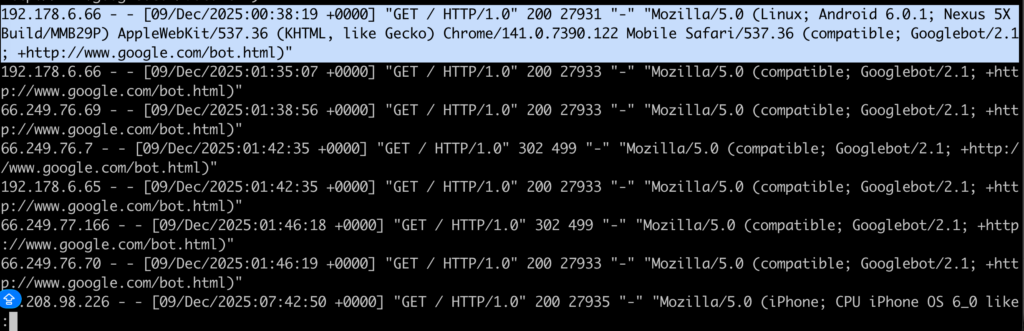
TL;DR: Yes, it took ~24h for Googlebot to visit the URL found in the <a href… placed in a <noscript> tag. Below the “protocol”.
This is the purpose of this SEO test.
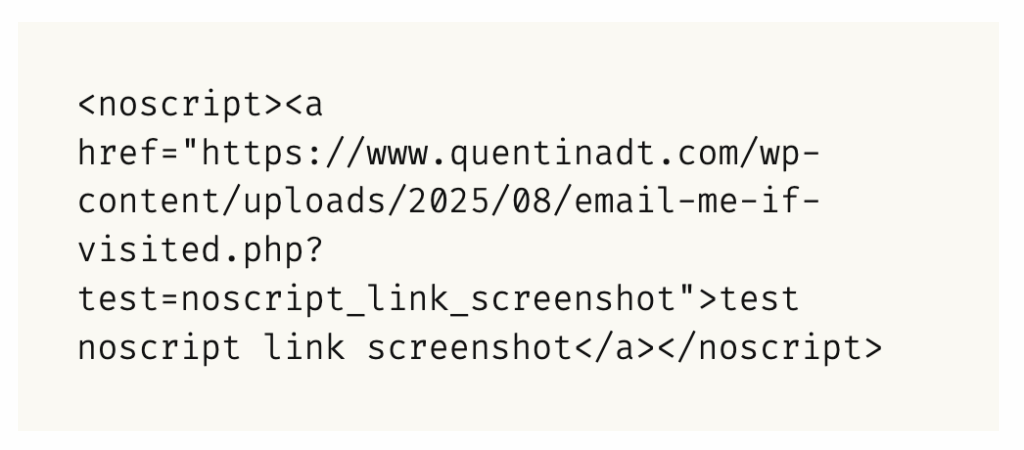
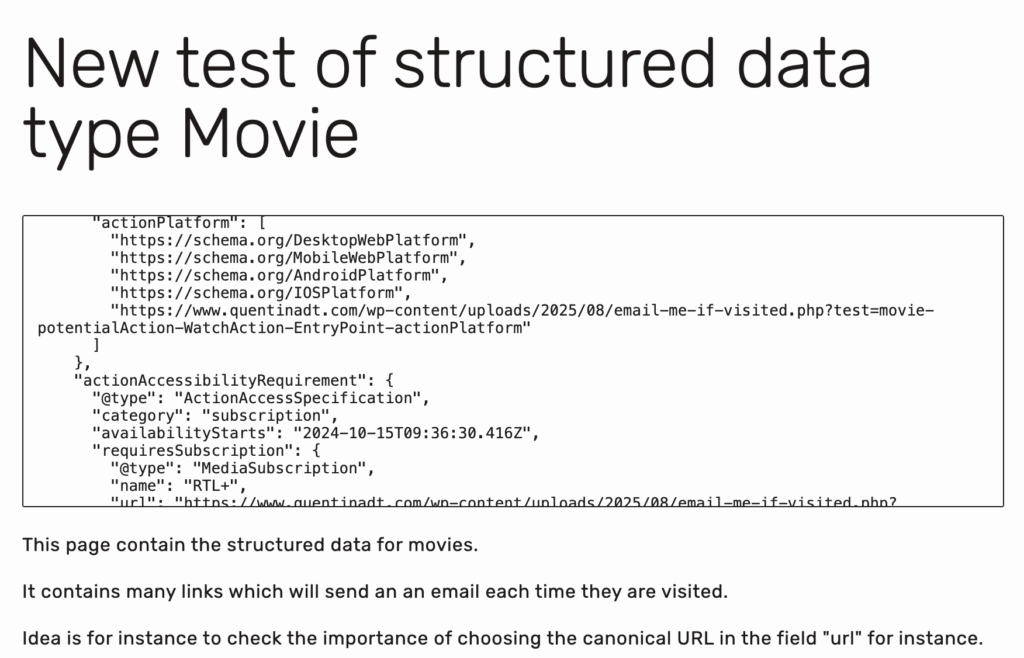
I’ve added a <noscript> tag in this page, and each time a bot crawls the links in the <noscript> tag, I’ll get an email.
A better version would be to also store in database the number of time it has been crawled, by which bots (using UserAgent + regex for instance). It might be easily implemented in WordPress as a plugin. But since I’m not very aware of how it works and because the result of this test is pretty important to take a decision, I’ll just keep my logic for tests as it is 🙂
This is how it looks in the source code; I’ve simply updated the content of the parameter “test” in the screenshot, to make sure that even if Googlebot uses OCR, it can’t discover the link
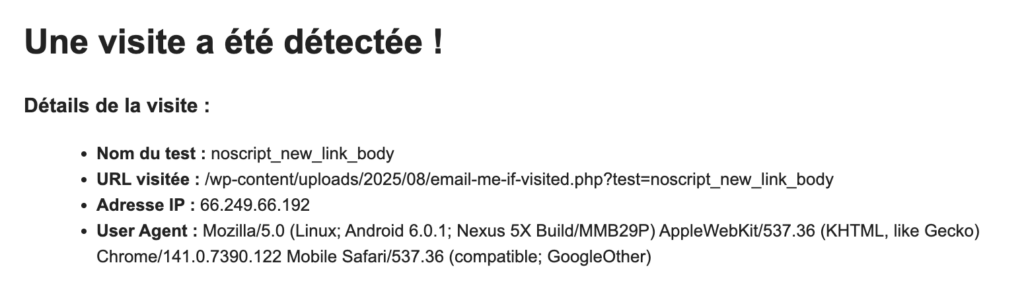
edit 08/12/2025: My bad, the HTML was between the <code> tag, so Googlebot couldn’t find it. I’ve added a new tag, so lets see if Googlebot visits it !
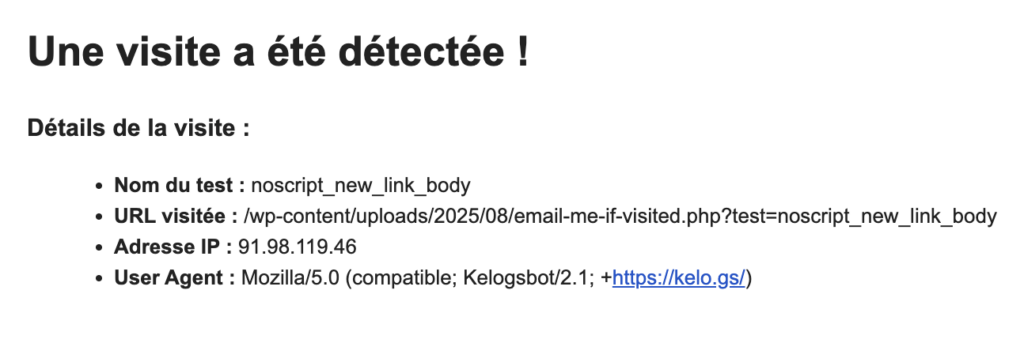
edit 09/12/2025: It works, but not exactly as expected. Googlebot came with the User Agent ‘GoogleOther’. This is not what is expected. I expected Googlebot Mobile (or Desktop). CrawlGenius (formerly Kelo.gs) also discovered the URL 😉
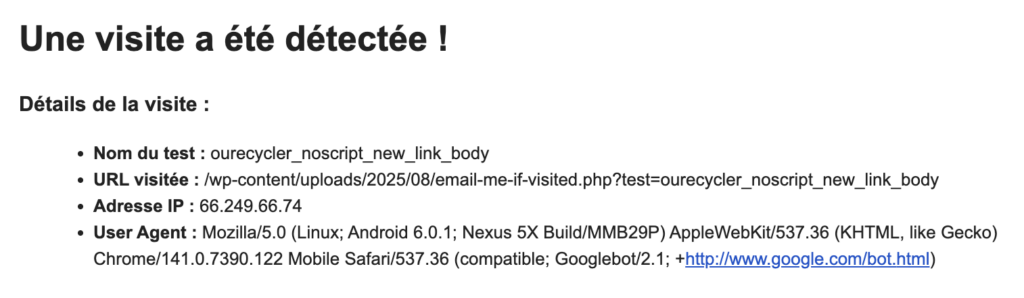
=> Lets see in few days if it comes back with another User Agent !
edit 10/09/2025: It works as expected. Googlebot came to visit the “honeypot” URL, and this time with the good Googlebot. It took it A bit more than 24 hours to visit the link. It’s seems a lot, especially because the link was on the homepage, so I’ll now put a link not hidden in <noscript> to check if it takes less time to Googlebot to crawl the link.
Cette page est une page de test SEO. L’objectif est de déterminer quel extrait de texte Google choisit d’afficher dans ses résultats de recherche lorsqu’une balise ‘meta description’ et une balise ‘og:description’ sont toutes deux présentes et contiennent des informations différentes.
Voici un nouveau test, celui vise à vérifier l’impact de l’ajout des données structurées de type VideoObject
La video ci-dessous est assez banale. Elle a été générée avec Veo 3 de Gemini, et dure 8 secondes.
Cette page contient le code suivant (pas de embedUrl, mais un contentUrl):
<script type="application/ld+json">
{
  "@context": "https://schema.org",
  "@type": "VideoObject",
  "name": "L'avenir du SEO : la video test qui ne dit rien",
  "description": "Aucun aperçu rapide des évolutions futures du SEO et des tendances à surveiller pour rester compétitif.",
  "uploadDate": "2025-08-08",
  "duration": "PT8S",
  "contentUrl": "https://www.quentinadt.com/wp-content/uploads/2025/08/L_avenir_du_SEO_a_checker.mp4",
  "thumbnailUrl": "https://www.quentinadt.com/wp-content/uploads/2025/08/cropped-Screenshot-2025-08-08-at-10.50.56.png",
  "author": {
    "@type": "Person",
    "name": "Quentin Adt"
  }
}
</script>
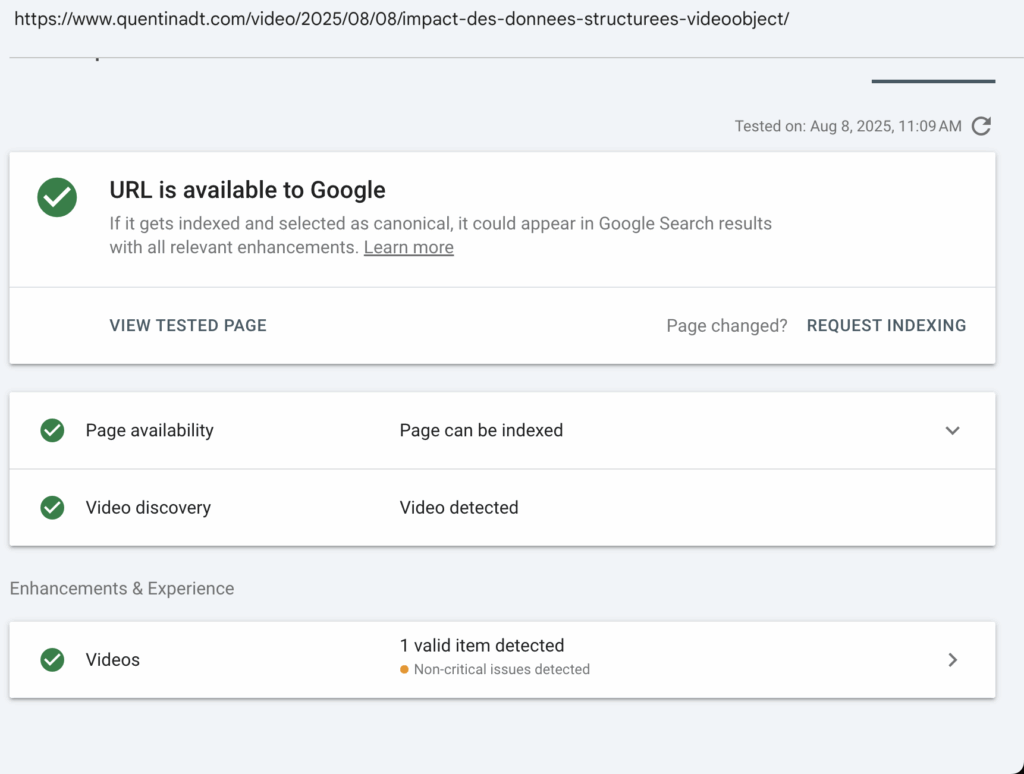
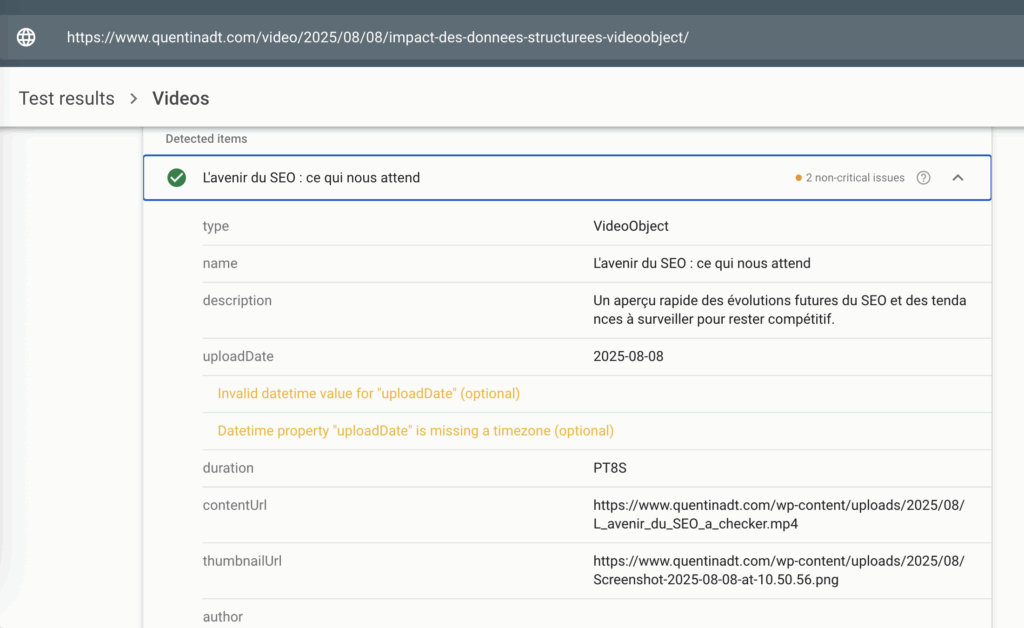
Ca passe côté Google et test données structurées
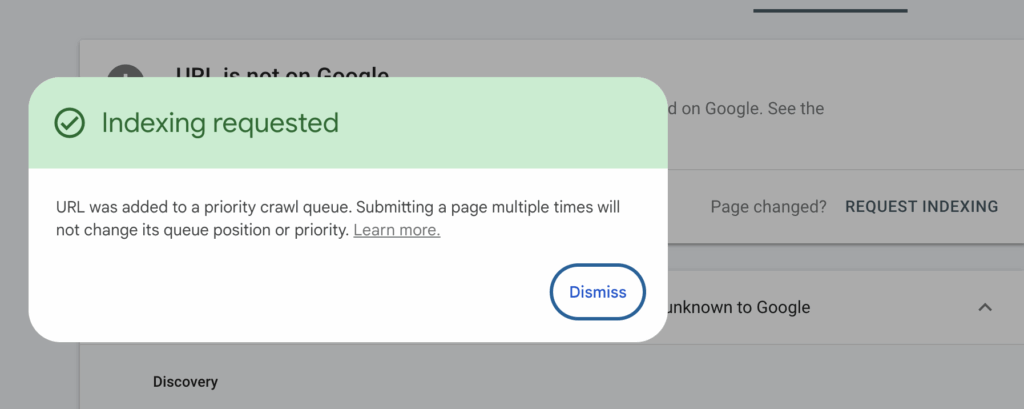
Et pour gagner du temps, j’ai forcé la tentative d’indexation:
Une femme fait le premier pas lorsqu’elle prend l’initiative de créer ou de faire avancer le contact : elle vous aborde, vous écrit, propose de vous revoir ou exprime son attirance. Pour savoir si cette initiative est romantique, ses paroles et une invitation clairement formulée sont plus utiles qu’un sourire, un regard ou un émoji. Si l’intention reste ambiguë, une question simple permet de la clarifier.
Il n’existe pas de code unique de la séduction féminine, en France ou ailleurs. Certaines personnes sont directes, d’autres réservées. L’objectif est de comprendre ce qu’elle vous propose réellement, sans transformer chaque geste amical en déclaration d’intérêt.
Qu’est-ce que « faire le premier pas » ?
Cette expression peut désigner trois initiatives différentes :
Établir le contact : venir vous parler, vous envoyer un premier message ou vous demander votre numéro. Elle ouvre un échange, dont le sens peut encore être amical.
Proposer de passer du temps ensemble : vous inviter à un café, à une promenade ou à une sortie à deux. Elle souhaite vous voir ; le caractère amoureux de la rencontre reste parfois à préciser.
Exprimer une attirance : dire « tu me plais » ou proposer explicitement un rendez-vous amoureux. Son intérêt est alors formulé, sans que cela engage l’un ou l’autre à une relation.
Une femme peut prendre chacune de ces initiatives. Vous n’avez pas à supposer qu’elle attend forcément que vous fassiez le reste.
Quels signes observer sans tirer de conclusion trop vite ?
Ce tableau aide à distinguer ce que vous observez de ce que vous imaginez. Ce sont des repères pratiques, pas un test d’attirance.
Ce qu’elle fait
Ce que cela permet de comprendre
Comment réagir
Elle vous regarde, sourit ou rit à vos blagues.
Elle peut apprécier l’échange, être polie ou simplement de bonne humeur. Cela ne prouve pas une attirance.
Échangez naturellement si le contexte s’y prête, sans présumer de son intérêt.
Elle vient vous parler ou vous écrit spontanément.
Elle prend l’initiative du contact. Son intention peut être amicale, pratique ou romantique.
Répondez si vous en avez envie et voyez si la conversation se construit à deux.
Elle relance la conversation et propose de vous revoir.
Elle contribue à maintenir le lien. Une amitié peut aussi fonctionner ainsi.
Accueillez la proposition et précisez vos intentions si nécessaire.
Elle propose une sortie à deux, avec un jour et un lieu.
C’est une invitation concrète. Le tête-à-tête n’est pas automatiquement un rendez-vous amoureux.
Acceptez, déclinez ou demandez comment elle envisage cette sortie.
Elle dit « tu me plais » ou parle d’un rendez-vous amoureux.
Elle exprime une attirance ou une intention romantique.
Dites-lui simplement si cet intérêt est partagé.
Les limites du langage corporel
Un regard prolongé, une proximité physique, une taquinerie ou une main dans les cheveux peuvent avoir plusieurs explications. Dans un lieu bruyant, se rapprocher permet aussi de mieux entendre. Demander une direction ou de l’aide peut être une demande littérale.
À l’inverse, détourner les yeux ou parler peu ne suffit pas à conclure à un désintérêt : l’aisance sociale et les habitudes de communication varient. Cela ne permet pas non plus de présumer une attirance cachée. N’utilisez pas une liste de gestes comme une preuve ou comme une autorisation de contact physique.
Cette difficulté apparaît dans une étude de Hall, Xing et Brooks sur la détection du flirt : après un bref échange entre inconnus hétérosexuels, les participants reconnaissaient mieux l’absence de flirt que sa présence, évaluée à partir des déclarations de leur interlocuteur. Ce résultat expérimental ne constitue pas un test individuel et ne décrit pas spécifiquement les femmes françaises.
Par SMS ou sur une application : qu’est-ce qui compte ?
Le contenu d’un message renseigne davantage sur la proposition que le nombre de caractères ou la vitesse de réponse. Comparez ces exemples :
« Je connais un bar sympa à Bastille » : elle partage une adresse ; elle ne vous a pas nécessairement invité.
« Ça te dit qu’on aille boire un verre tous les deux jeudi ? » : elle propose une rencontre concrète.
« Tu me plais, j’aimerais qu’on se voie en rendez-vous » : elle précise aussi son intention romantique.
Un cœur, un « like », une réaction à une story ou une réponse immédiate peuvent être amicaux. Une réponse tardive peut correspondre à un emploi du temps chargé ou à une autre manière d’utiliser son téléphone. Il n’y a pas de délai de réponse qui démontre à lui seul l’intérêt ou le désintérêt.
Comment distinguer intérêt amoureux et amabilité ?
Regardez le contexte et la réciprocité : chacun engage-t-il parfois l’échange, pose-t-il des questions et participe-t-il aux projets ? Si elle est indisponible mais propose elle-même un autre moment, elle contribue concrètement à la rencontre. Cela indique une volonté de vous voir, sans déterminer à lui seul la nature de ses sentiments.
Au travail, dans un commerce ou dans une relation de service, le sourire et l’attention peuvent faire partie du rôle professionnel. Dans un groupe d’amis, une personne chaleureuse peut se comporter ainsi avec tout le monde. Tenez-en compte sans la surveiller ni chercher à comptabiliser ses gestes.
Quand cette distinction compte pour vous, formulez votre question : « Ça me ferait plaisir de te voir en rendez-vous amoureux. Est-ce que ça te tente ? » Si elle vous a invité : « Tu pensais à une sortie entre amis ou à un rendez-vous ? » Ces formulations sont des exemples à adapter. Elles suivent le principe de communication explicite des attentes présenté par love is respect : parler de ce que l’on souhaite évite d’imposer ses suppositions à l’autre.
Comment réagir si elle fait le premier pas ?
Si elle vous plaît aussi
Répondez chaleureusement et faites une proposition simple : « Oui, ça me ferait plaisir de te revoir. Tu serais disponible samedi pour un café ? » Si elle a exprimé son attirance, vous pouvez lui dire qu’elle vous plaît également. Choisissez ensemble un moment et un lieu qui vous conviennent.
Si vous hésitez ou si vous n’êtes pas intéressé
Vous pouvez prendre votre temps : « J’aime bien discuter avec toi, mais je préfère qu’on apprenne à se connaître tranquillement. » Vous pouvez aussi refuser : « Merci pour ton invitation. De mon côté, je préfère qu’on reste sur une relation amicale. » Recevoir une initiative ne vous oblige pas à l’accepter.
Si elle refuse, reste vague ou ne répond plus
Un refus ou une précision comme « je te vois comme un ami » doit être respecté. N’y voyez pas un jeu à gagner en insistant. Si elle reste vague, vous pouvez laisser la porte ouverte : « D’accord, dis-moi si tu en as envie. » Sans réponse ou sans accord clair, ne multipliez pas les sollicitations et ne considérez pas le rendez-vous comme accepté. Vous n’avez pas besoin de connaître la raison exacte de son silence pour lui laisser de l’espace.
Faire le premier pas ne vaut pas consentement à un rapprochement
Flirter, donner son numéro ou accepter un rendez-vous ne signifie pas accepter un baiser ou un rapport sexuel. Selon les repères sur le consentement de RAINN, l’accord doit être libre, clair, propre à l’activité concernée et peut être retiré à tout moment. Le silence ou l’absence de résistance ne valent pas accord.
Avant un baiser, vous pouvez demander : « J’ai envie de t’embrasser, est-ce que tu en as envie aussi ? » En cas d’hésitation, de retrait ou de malaise, arrêtez-vous. Si son état ne lui permet pas de décider librement, notamment en cas de forte alcoolisation, ne poursuivez pas le rapprochement.
Questions fréquentes
Une femme timide peut-elle faire le premier pas ?
Oui, par exemple en envoyant un message ou en proposant une activité. Mais la timidité supposée ne permet pas d’interpréter son silence comme une invitation. Une proposition simple, à laquelle elle peut librement répondre, est préférable à une tentative de décoder tous ses gestes.
Si elle écrit toujours en premier, est-elle amoureuse ?
Cela montre qu’elle initie les échanges, pas qu’elle est amoureuse. Une amie peut aussi écrire souvent. Distinguez le plaisir de discuter, l’attirance et des sentiments amoureux : le premier ne suffit pas à établir les autres.
Peut-on proposer un rendez-vous sans être certain de lui plaire ?
Oui, si le contexte s’y prête et qu’elle n’a pas déjà posé une limite. Présentez cela comme une invitation, sans pression, en acceptant qu’elle puisse refuser. Vous pouvez exprimer votre propre intérêt sans affirmer connaître le sien.
In this post I will change the canonical URL in the <head>, just to see how Google and Googlebot behave between discovery of the URL discovered in the tag.
I recently stated a huge difference between the traffic monitored in the Search Console and what I could find in the log files using Kelogs log analyzer. My first hypothesis is that Google Image could be at the origin of this difference, with a preload in background. Second hypothesis is that the first results in Google Web is preloaded if the page is usually too slow.
Protocol to check the first hypothesis:
I’ll try to get the image below indexed for this website, despite it is hosted on amazon, and I will live check the impact on log files when I search for it in Google.
Let’s come back in few days when Googlebot will have indexed this page and display the image in Google Image (I’ll use “site:quentinadt.com” to check it).
So here is the picture of someone swimming:
To check the second hypothesis, Ill make a page which is very slow but ranks on a specific unique keyword.
In this post, there is a background image. It is the picture of my 3 years old Macbook Pro 2016 which is already dying… The screen is sometimes not usable, and most of the time there is just one line, vertical.
The idea is to check if either of not Google will index an image which is accessible only from a background CSS call.
John Muller, from Google, in 2018:
And as far as I know we don’t use CSS images at all for image search.
If you’ve read my last blog post, you will see that it didn’t help to use the title of an image to rank in the SERPs.
So I decided to push the test a little bit further, until I manage to get the image indexed.
So here is the picture of a very rare – endemic – fish that you can found only in Croatian rivers. I’m note passionate about fish, but I thought it’s an ok picture for testing the ranking capacities of the title element.
So again, I’ve added a title, but this time, it contains what most probably is the name of this endemic fish.
I recently read that Google uses the title of the images to rank them in Google Images.
It would be kind of a little revolution, since it has never been considered as useful.
I decided to make my own test, just to make sure it works also for me.
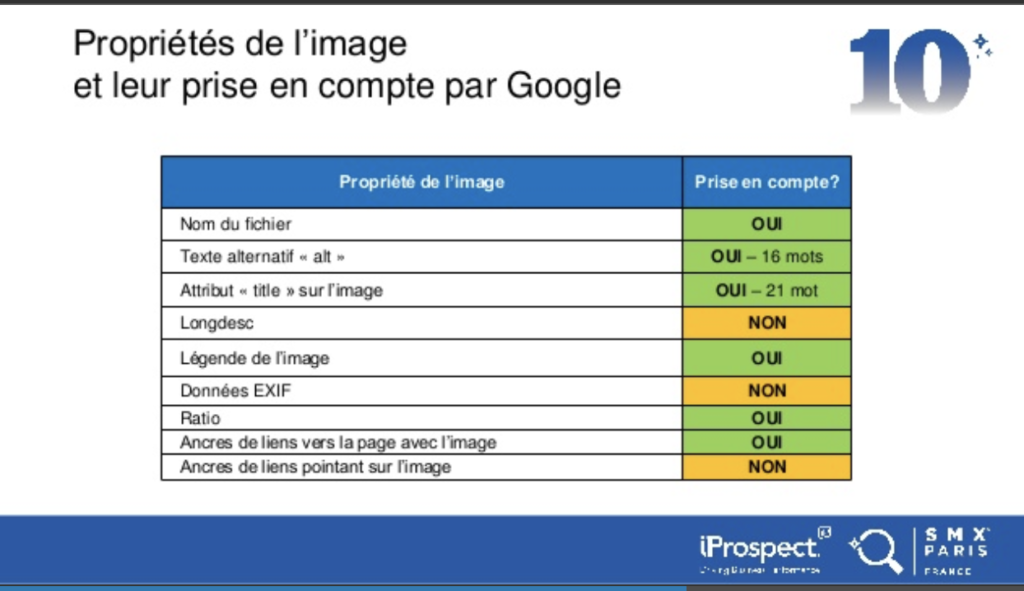
So here is the picture, it’s a screenshot of a presentation shared on Linkedin. There are 34 keywords in the title. You can only find the keywords in the title.
This page will be updated with the results !
Edit 1: 3 days later, the page is indexed, but the keywords in the title aren’t findable in Google. So currently, the title has zero impact.
Edit 2: 2 weeks after, still no result when I search a keyword found in the title.
Je vais devoir déplacer une cuisinière en fonte, ce qui peut être une tâche difficile en raison de son poids et de sa taille. J’ai donc fait tourner chatGPT, voici les quelques étapes clés énoncées par cet outil pour vous aider à déplacer votre cuisinière en fonte en toute sécurité et efficacement.
Préparation: Avant de commencer, assurez-vous de débrancher votre cuisinière de la source de gaz ou d’électricité. Ensuite, retirez les éléments amovibles tels que les grilles, les brûleurs et les tiroirs pour réduire le poids et faciliter le déplacement.
Matériel nécessaire: Procurez-vous un diable ou un chariot de déménagement robuste pour supporter le poids de la cuisinière en fonte. Vous aurez également besoin de sangles de déménagement pour fixer l’appareil sur le diable et de gants de protection pour éviter les blessures.
Technique de levage: Avec l’aide d’au moins une autre personne, soulevez la cuisinière en fonte en utilisant vos jambes plutôt que votre dos pour éviter les blessures. Positionnez le diable sous la cuisinière, en vous assurant qu’il est bien centré et stable.
Fixation: Utilisez les sangles de déménagement pour attacher solidement la cuisinière en fonte au diable. Cela garantira qu’elle ne glisse pas ou ne bascule pas pendant le transport.
Déplacement: Faites rouler lentement et prudemment le diable en maintenant un contrôle constant sur la cuisinière en fonte. Prenez soin d’éviter les obstacles et les escaliers. Si vous devez monter ou descendre des escaliers, demandez de l’aide supplémentaire et utilisez une technique de levage appropriée pour réduire le risque de blessures.
Installation: Une fois arrivé à l’emplacement souhaité, détachez délicatement la cuisinière en fonte du diable et placez-la à sa nouvelle position. Rebranchez la source de gaz ou d’électricité et remettez en place les éléments amovibles.
En suivant ces étapes, vous devriez être en mesure de déplacer en toute sécurité votre cuisinière en fonte d’un endroit à un autre. N’oubliez pas de demander de l’aide si nécessaire et de prendre toutes les précautions pour éviter les blessures.